White balance explained with a Kelvin chart
by Piotr · Photography Tips
As an Amazon Associate I earn from qualifying purchases. Links to Amazon on this page are affiliate links.
In short: White balance cancels the color of the light so that white stays white. Light sources span from a 1,900 K candle to about 6,500 K daylight. Camera presets cover 2,500 K to 10,000 K. Kelvin steps are not even: in mireds, 2,000 to 2,500 K is a bigger shift than 5,000 to 8,000 K.
Your eyes adapt to the color of light. A sensor does not. Under a household bulb, a white shirt reflects orange light, and the camera records orange. White balance is the correction that turns it back to white. Get it right and colors look the way you remember them. Get it wrong and the whole frame wears a tint.
The trouble starts with the numbers. Light sources are rated in kelvins, and the published figures disagree. Camera presets disagree too. This page puts the cited values on one chart and does the arithmetic the slider hides.
What white balance does to the picture
White balance multiplies the three color channels by different amounts. The goal is simple: a neutral surface must come out with all three channels equal. Everything else in the frame shifts by the same correction.
The Nikon Z fc manual puts it in one line. White balance ensures that white objects appear white, regardless of the light source. The Canon EOS R7 manual adds the reason. The eye adapts to changes in lighting, so the camera has to do the adapting in software.
Color temperature is the label for the light's color. Nikon's manual calls it an objective measure, expressed in kelvins. Lower numbers are redder. Higher numbers are bluer.
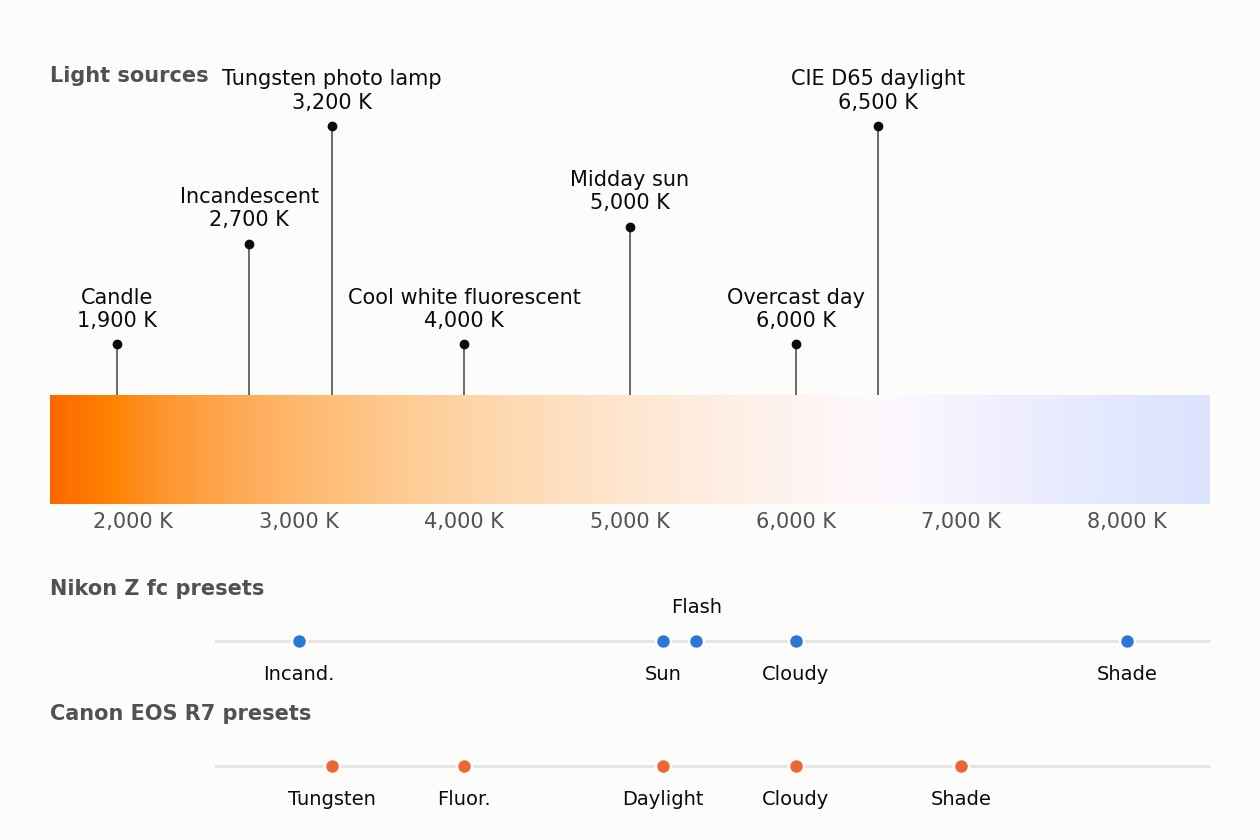
Kelvin chart of common light sources
Here are the values, each from a lighting manufacturer, a film maker or a standards body. Where two sources disagree, both are shown.
| Light source | Color temperature | Source |
|---|---|---|
| Sunrise | 1,700 K | Crompton Lamps |
| Low-pressure sodium street lamp | 1,800 K | Crompton Lamps |
| Candle | 1,900 K | Crompton Lamps |
| High-pressure sodium street lamp | 2,000 K | Crompton Lamps |
| Household incandescent bulb | 2,700 K | Crompton Lamps; Litetronics |
| CIE illuminant A, the tungsten reference | about 2,855.5 K | CIE |
| Halogen lamp | 3,000 K (Crompton) or 3,500 K (Litetronics) | Crompton Lamps; Litetronics |
| Tungsten photo lamp | 3,200 K | Kodak |
| Photolamp | 3,400 K | Kodak |
| Cool white fluorescent tube | 4,000 K | Crompton Lamps |
| Midday sunlight | 5,000 K | Crompton Lamps |
| Camera flash | 5,900 K | Crompton Lamps |
| Overcast day | 6,000 K | Crompton Lamps |
| CIE D65, a phase of daylight | about 6,500 K | CIE |
| Daylight fluorescent tube | 6,500 K | Crompton Lamps |
Two things stand out. Halogen is 3,000 K in one catalog and 3,500 K in another. And daylight is not one number: 5,000 K for midday sun, 6,000 K for overcast, 6,500 K for the CIE daylight standard. A photo of a sunny street holds both sun and blue sky. The light is a mix, which is why auto white balance exists.
Camera white balance presets, Nikon against Canon
A preset is a guess about the light, written as a Kelvin value. Both manuals publish their guesses, and they do not match.
| Preset | Nikon Z fc | Canon EOS R7 | Difference |
|---|---|---|---|
| Incandescent or tungsten | about 3,000 K | 3,200 K | 20.8 mireds |
| Fluorescent | 4,200, 5,000 or 6,500 K by tube type | 4,000 K (white fluorescent) | depends on tube |
| Daylight or direct sunlight | about 5,200 K | 5,200 K | none |
| Flash | about 5,400 K | about 6,000 K when the flash cannot report its own | 18.5 mireds |
| Cloudy | about 6,000 K | 6,000 K | none |
| Shade | about 8,000 K | 7,000 K | 17.9 mireds |
| Manual Kelvin range | about 2,500 to 10,000 K | about 2,500 to 10,000 K, in 100 K steps | |
| Auto | about 3,500 to 8,000 K, three variants | 3,000 to 7,000 K (ambience priority) |
The mired column is the honest way to compare, and the next section explains why. For scale, three of the gaps sit near 18 to 21 mireds. That is about the shift of one 500 K click between 5,000 K and 5,500 K, which computes to 18.2 mireds.
So neither brand is wrong. Shade and flash simply have no single color, and each maker picked a different spot. The camera's own preset values are the ones to trust on your camera.
The Kelvin slider is not linear
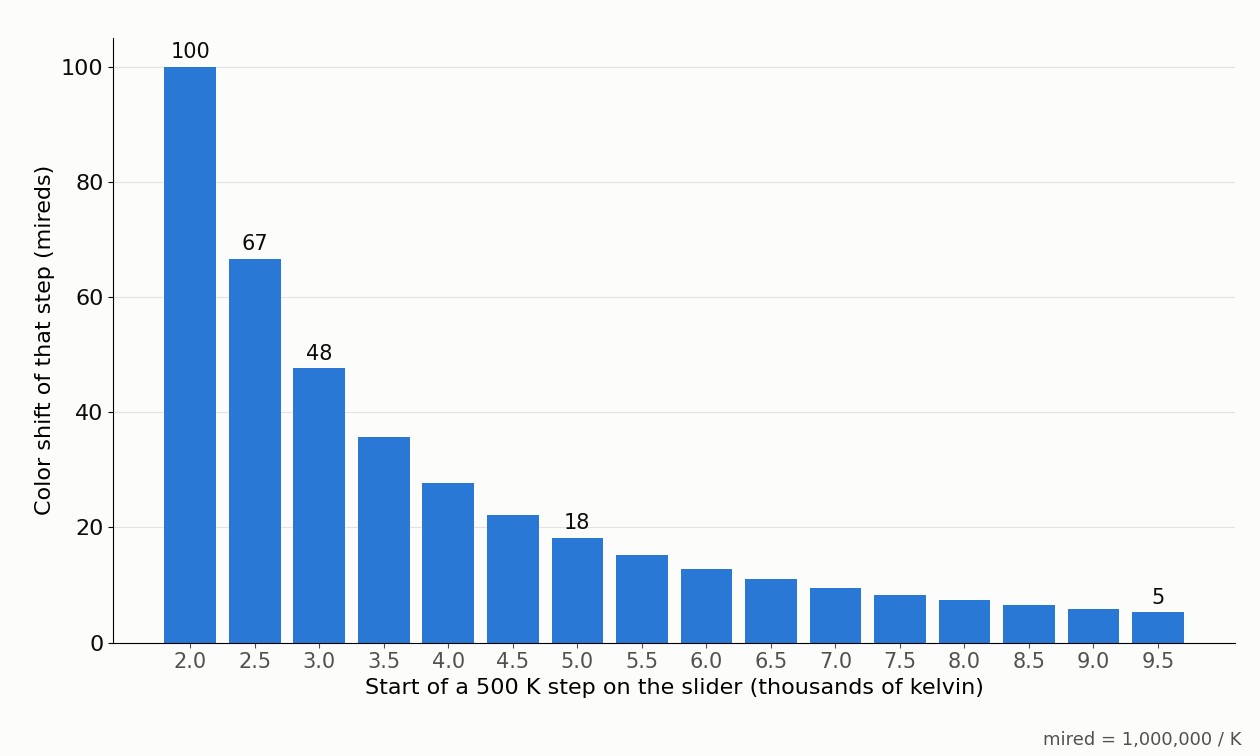
Equal Kelvin steps are not equal shifts. The fair unit is the mired: one million divided by the color temperature in kelvins, as the Wikipedia article on the unit defines it. The same article notes that photographers rate the color shift of filters and gels in mireds.
| Move on the slider | Mired shift |
|---|---|
| 2,000 to 2,500 K | 100.0 |
| 3,000 to 3,500 K | 47.6 |
| 5,000 to 5,500 K | 18.2 |
| 6,000 to 6,500 K | 12.8 |
| 9,500 to 10,000 K | 5.3 |
| One Canon 100 K step at 2,500 K | 15.4 |
| One Canon 100 K step at 9,900 K | 1.0 |
| Tungsten 3,200 K to daylight 5,200 K | 120.2 |
The practical rule falls out of the table. Under warm light, small Kelvin changes matter a lot. Fine-tune in 100 K steps under bulbs and in 500 K steps under sky. A 1,000 K argument about shade at 7,000 or 8,000 K is a smaller color difference than a 200 K argument about tungsten.
How hard the camera works under warm light
Correcting warm light means amplifying blue. The table below computes how much, for a white card lit by a blackbody of each temperature. It uses Planck's law, the CIE 1931 color matching functions and the sRGB primaries, and it reports each channel's gain relative to green.
| Light | Blue gain | Red gain | Blue gain in stops |
|---|---|---|---|
| 2,700 K | 4.19× | 0.42× | +2.07 |
| 3,000 K | 3.10× | 0.48× | +1.63 |
| 3,200 K | 2.66× | 0.52× | +1.41 |
| 4,000 K | 1.73× | 0.65× | +0.79 |
| 5,000 K | 1.26× | 0.79× | +0.33 |
| 5,200 K | 1.20× | 0.82× | +0.26 |
| 6,000 K | 1.03× | 0.90× | +0.04 |
| 7,000 K | 0.89× | 0.98× | −0.17 |
| 8,000 K | 0.80× | 1.05× | −0.32 |
Under a 2,700 K bulb, blue needs about two stops of extra gain. Amplifying a signal makes its noise more visible, as what ISO is explains for the whole image. In warm indoor shots, the blue channel gets the most amplification.
At the candle's 1,900 K the computation runs out of blue entirely: the blue value is zero, and no gain can bring it back. Both camera manuals stop their manual range at about 2,500 K. Neither offers a setting that low, so candlelight keeps an orange cast.
A caveat on the method. A camera sensor's color filters are not the sRGB primaries, so real multipliers differ. The direction and the shape of the curve are the same.
Warmer setting, warmer picture
Here is the part that trips people up. A higher white balance setting makes the picture warmer, not cooler.
The Nikon manual spells it out. Choose lower values if pictures have a red cast or to make them bluer. Choose higher values if they are tinged blue or to make them redder. The setting describes the light you are cancelling, not the look you get. Tell the camera the light is 8,000 K and it adds orange to cancel blue that may not be there.
How to use a gray card for white balance
A gray card gives the camera a neutral target in the actual light. The Canon EOS R7 manual describes the procedure for custom white balance, and Nikon's equivalent is Preset manual.
- Place a gray card or a plain white object where the subject is, in the same light.
- Fill the frame with it. Canon says to switch to manual focus.
- Shoot it at normal exposure. Canon warns that a frame far from standard exposure may give a wrong result.
- In the menu, register that frame as the custom white balance.
- Select the custom setting and shoot.
Canon lists three acceptable targets: a white object, a gray card or a standard 18% gray reflector. The manual also advises a magenta or green correction when you set a Kelvin value for artificial light. Kelvin covers only the orange to blue axis, so the tint gets a second control.
If you shoot RAW, a single frame of the card is enough. Use it later as the click point for the white balance picker.
Rule of thumb: Use auto white balance in daylight, the tungsten preset under bulbs, and a gray card when color must be exact. Fine-tune in mireds, not kelvins: small steps under warm light, large steps under cool light.
White balance and RAW files
In a RAW file, white balance is a note, not a change. The Wikipedia article on raw formats explains that conversion applies white balance, along with gamma and demosaicing, to the stored sensor data in one step. A JPEG arrives with the correction already applied.
So with RAW, a wrong preset costs nothing. The full trade-off is in RAW vs JPEG. White balance still matters at the shutter, because the preview and the histogram use it. How to read that histogram is in metering modes and the histogram.
How the numbers were computed
Mireds are 1,000,000 divided by the Kelvin value. Blackbody spectra use Planck's law with the second radiation constant 1.438776877 × 10⁻² m·K from NIST. Each spectrum is weighted by the CIE 1931 2° color matching functions from the CIE dataset. The result goes to linear sRGB through the matrix in the sRGB standard. The channel gains are green divided by each channel. As a check, the 6,504 K blackbody computes to x = 0.3135, y = 0.3236, close to the D65 white point of x = 0.3127, y = 0.3290. The sRGB article notes that D65 is not an ideal blackbody, which explains the small gap. The color strip uses the same computation, scaled to the brightest channel and encoded with the sRGB transfer curve.
Verdict
White balance is one correction with a misleading dial. Kelvin values for real lights scatter by hundreds of degrees between catalogs, and camera presets differ by brand. None of that matters much in daylight, where 500 K is a small step. It matters a lot under bulbs, where the same step is a large one. Shoot a gray card when color counts, think in mireds when you fine-tune, and shoot RAW when you cannot control the light.
Frequently asked questions
- What is white balance in photography?
- White balance is the correction a camera applies so that white objects look white under the light you shoot in. Candles and household bulbs are orange, while shade and overcast sky are bluish. The camera multiplies each of its three color channels by a different amount to cancel that cast. Auto white balance picks the correction itself.
- What does white balance do?
- It shifts every color in the picture by the same correction, chosen to make a neutral surface come out neutral. Under a 3,200 K tungsten lamp, the computation on this page shows the blue channel needs 2.66 times the gain of green. Get the setting wrong and the whole frame carries an orange or blue cast.
- What is Kelvin white balance?
- It is a manual mode where you type in the color temperature of the light. Canon and Nikon both offer about 2,500 K to 10,000 K. Set the number of your light source and the camera cancels it. A higher setting makes the picture warmer, and a lower setting makes it bluer, which is the reverse of what the word cooler suggests.
- How do you use a gray card for white balance?
- Put the card in the light your subject is in and fill the frame with it. Take a correctly exposed shot, then register it in the custom white balance menu, which Canon calls Custom White Balance and Nikon calls Preset manual. Select that custom setting and shoot. Canon allows a white object, a gray card or an 18% gray reflector.
- What is the best white balance for a sunny day?
- The daylight preset. Both Nikon and Canon set it to about 5,200 K. For subjects in the shade on the same day, switch to the shade preset: Nikon uses about 8,000 K and Canon about 7,000 K. Auto white balance also works well in plain daylight. If you shoot RAW, you can change the choice later without any loss.
- Does white balance matter when shooting RAW?
- Less than with JPEG. A RAW file keeps the sensor data, and white balance is applied when the file is converted, so you can change it afterward. A JPEG has the correction baked in. Setting white balance correctly still helps, because the camera preview and histogram use it.
Sources
- Colour Temperature Guide, Crompton Lamps (2015)
- CIE standard illuminant (e-ILV 17-23-021), CIE (2026)
- KODAK PROFESSIONAL PORTRA 400 Film, technical data E-4050 (light source table), Kodak Alaris (2016)
- Color temperature, Litetronics (2026)
- Z fc Reference Guide: White balance, Nikon (2026)
- EOS R7 manual: White Balance, Canon (2026)
- Mired, Wikipedia (2026)
- CIE 1931 colour-matching functions, 2 degree observer (dataset), CIE (2026)
- CODATA value: second radiation constant, NIST (2026)
- sRGB, Wikipedia (2026)
- Raw image format, Wikipedia (2026)