RAW or JPEG - the tonal levels, counted
by Piotr · Photography Tips
As an Amazon Associate I earn from qualifying purchases. Links to Amazon on this page are affiliate links.
In short: A JPEG stores 256 levels per channel, a 12-bit RAW file 4,096 and a 14-bit file 16,384. The extra levels are not spread evenly: RAW puts half of them in the brightest stop. Eight stops down, a JPEG has 9 levels and a 14-bit RAW file has 64. Shoot RAW when you will edit, JPEG when you will share straight from the camera.
The RAW versus JPEG argument usually runs on adjectives: more data, more flexibility, digital negative. This page counts instead. Every level in both formats gets sorted into the stop of brightness it belongs to. The count shows where RAW's advantage is large, where it is small, and where it is a number on a spec sheet.
What a RAW file is and what a JPEG is
A RAW file is the sensor readout before it becomes a picture. The Wikipedia article on raw formats puts it at 12 or 14 bits per pixel. That is 4,096 to 16,384 shades, against the 8 bits and 256 shades of a typical gamma-compressed image. The converter applies white balance, gamma and demosaicing to that data in one step, after the shot.
A JPEG is the finished picture. The camera has already chosen the white balance, contrast and sharpening. Then it compresses the result with a lossy method, as the Wikipedia article on JPEG describes it.
Two facts decide everything below. Camera sensors usually respond linearly to light, according to the Wikipedia article on gamma correction. And a JPEG stores its values through the sRGB transfer curve, which is not linear at all.
Tonal levels per stop: the table no spec sheet prints
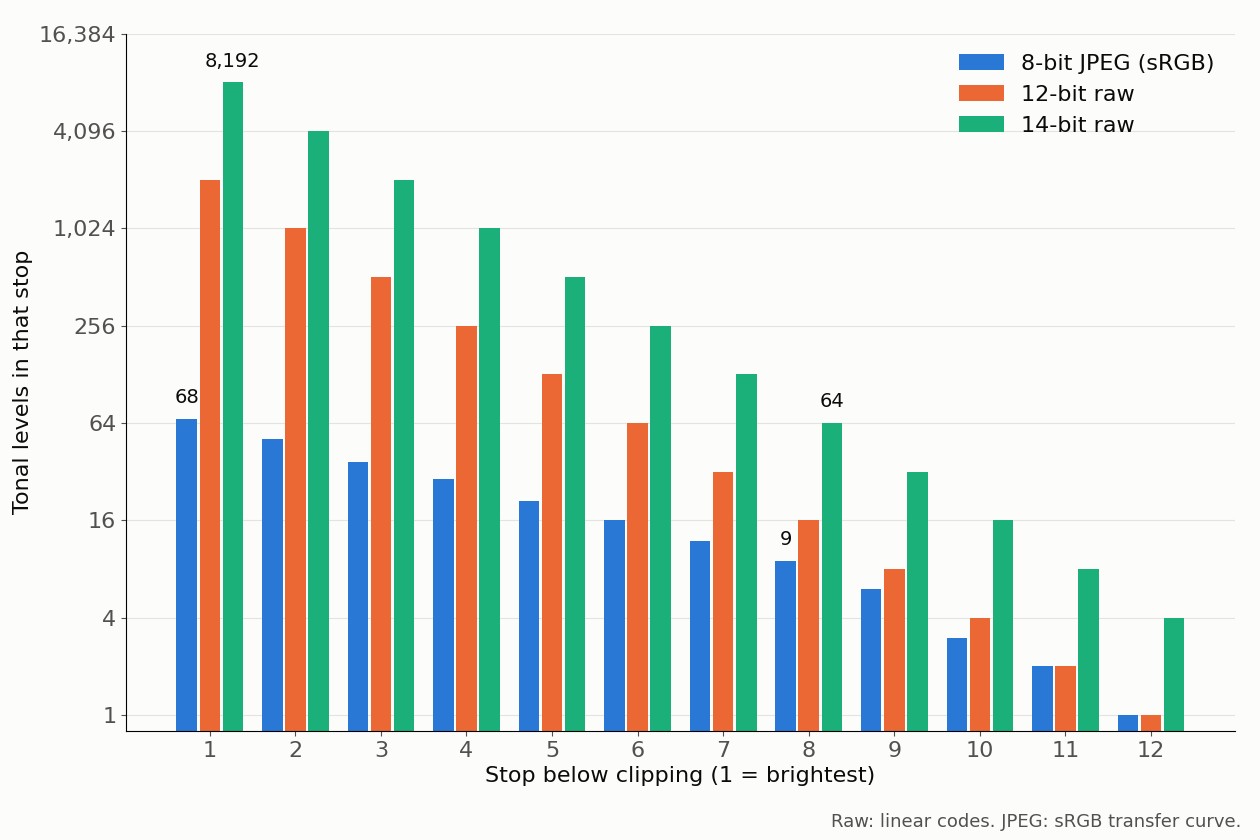
Linear data spends half its levels on the brightest stop. Each stop down gets half of what the stop above had. A gamma curve spreads the levels far more evenly. Here is the count:
| Stop below clipping | 8-bit JPEG (sRGB) | 12-bit RAW | 14-bit RAW | 14-bit RAW per JPEG level |
|---|---|---|---|---|
| 1 (brightest) | 68 | 2,048 | 8,192 | 120× |
| 2 | 51 | 1,024 | 4,096 | 80× |
| 3 | 37 | 512 | 2,048 | 55× |
| 4 | 29 | 256 | 1,024 | 35× |
| 5 | 21 | 128 | 512 | 24× |
| 6 | 16 | 64 | 256 | 16× |
| 7 | 12 | 32 | 128 | 11× |
| 8 | 9 | 16 | 64 | 7× |
| 9 | 6 | 8 | 32 | 5× |
| 10 | 3 | 4 | 16 | 5× |
| 11 | 2 | 2 | 8 | 4× |
| 12 | 1 | 1 | 4 | 4× |
The main ratio quoted is 64: 16,384 levels against 256. The table shows where that ratio actually lives. In the brightest stop, RAW has 120 times the levels. In the eighth stop, 7 times. By the twelfth, 4 times.
So the myth is half true. RAW does have vastly more levels, but mostly in the highlights, where a JPEG already has plenty. In the deep shadows, the gap shrinks to single digits.
A JPEG holds more than 8 stops
The opposite myth says 256 levels can only cover 8 stops, one bit per stop. That would be true for linear data. An 8-bit linear file would put 128 levels in the top stop, 64 in the next, and run out after the eighth.
The sRGB curve fixes that. Its darkest nonzero code, 1, decodes to 0.03% of white, which is 11.7 stops down. The Wikipedia article on JPEG gives the same answer in round numbers: because the encoding is non-linear, an 8-bit JPEG covers about 11 stops. The gamma curve is the single reason an 8-bit JPEG works at all.
What brightening shadows costs in each format
Levels matter when you stretch them. Brighten a dark area by three stops and its levels must fill a brighter stop, which needs more of them. If the file has fewer levels than the output needs, tones skip values. In smooth areas, skipped values show up as bands.
The table compares the levels each format holds in a dark stop with the levels the final JPEG uses for the stop they move into.
| Push | From stop | To stop | Final JPEG uses | JPEG source has | 12-bit RAW has | 14-bit RAW has |
|---|---|---|---|---|---|---|
| +3 stops | 6 | 3 | 37 | 16 | 64 | 256 |
| +3 stops | 8 | 5 | 21 | 9 | 16 | 64 |
| +3 stops | 10 | 7 | 12 | 3 | 4 | 16 |
| +4 stops | 8 | 4 | 29 | 9 | 16 | 64 |
A JPEG falls short on every row. A 12-bit file covers the push from stop 6 and falls short from stop 8 down. A 14-bit file covers every row. This is the honest case for RAW: not more range, but enough levels to survive editing.
A level count is a ceiling. Sensor noise decides what share of those levels carry picture, and the deep shadows are where noise lives. Treat the 14-bit advantage as real for a clean, low-ISO file and as smaller for a noisy one. The noise side is in what ISO is.
Highlights are a different story. Clipped is clipped in any format, as metering modes and the histogram shows. Expose so the histogram stays off the right edge, then lift shadows from RAW.
File size and buffer: what RAW costs
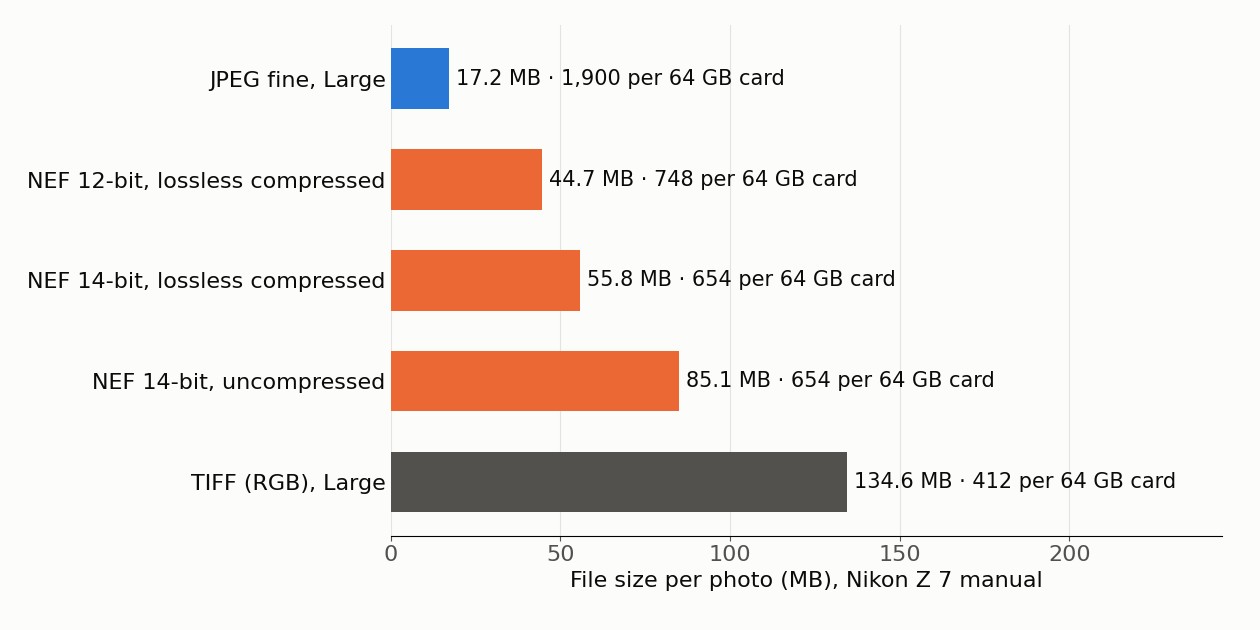
The price of RAW is storage and speed. Nikon's Z 7 manual lists both for a 64 GB card:
| Format on the Nikon Z 7 | File size | Photos per 64 GB card | Burst buffer |
|---|---|---|---|
| JPEG fine, Large | 17.2 MB | 1,900 | 25 |
| RAW 12-bit, lossless compressed | 44.7 MB | 748 | 23 |
| RAW 14-bit, lossless compressed | 55.8 MB | 654 | 19 |
| RAW 14-bit, uncompressed | 85.1 MB | 654 | 18 |
A 14-bit RAW file is 3.2 times the size of a fine JPEG, from the first two size figures. Nikon's capacity column lists the same 654 frames for compressed and uncompressed 14-bit files. The manual adds that all figures are approximate and vary with the scene.
RAW is not always lossless, either. Nikon's Z 7II manual offers three types. Lossless compressed keeps full quality at 60 to 80 percent of the uncompressed size. Compressed uses a non-reversible algorithm at 45 to 65 percent, with nearly the same quality. Read your camera's menu before trusting the word RAW.
RAW or JPEG for each kind of shoot
| Shoot | Format | Why |
|---|---|---|
| Landscape, high contrast | 14-bit RAW | Deep shadows need the levels in the push table |
| Mixed or artificial light | RAW | White balance is set in conversion; see white balance |
| Sports and long bursts | JPEG fine or 12-bit RAW | Buffer of 25 or 23 frames against 19 for 14-bit |
| Travel with limited storage | JPEG fine | About 2.5 times the frames per card of 12-bit RAW |
| Family events shared the same day | JPEG | Finished in the camera, no converter needed |
| Unsure, or learning to edit | RAW plus JPEG | A ready JPEG now, the RAW file for later |
The storage row is the one a bigger card solves. A larger memory card costs less than a missed RAW file in difficult light. The other rows are about the picture, and no card changes them.
Setting up RAW on the camera
The Nikon menus make a good map, and other makers use similar items.
- Set image quality to RAW, or to RAW plus JPEG fine if you want a ready copy. Nikon notes that deleting the JPEG also deletes the RAW file.
- Set RAW compression to lossless compressed. It keeps full quality at 60 to 80 percent of the uncompressed size.
- Set bit depth to 14-bit, and drop to 12-bit only when the burst buffer runs short.
- Expose so the histogram stays off the right edge, then lift shadows in the converter.
- Set white balance anyway, because the preview and the histogram use it.
Rule of thumb: If you will open the file in an editor, shoot RAW, and 14-bit when the buffer allows. If the picture is finished when you press the shutter, shoot JPEG. When in doubt, use RAW plus JPEG and decide later.
How the numbers were computed
RAW levels are linear: stop k below clipping holds the codes between 2⁻ᵏ and 2⁻⁽ᵏ⁻¹⁾ of full scale, which is 2^(bits − k) codes. JPEG levels use the sRGB decoding function from the Wikipedia article on sRGB. With V as the code divided by 255, the linear value is V/12.92 up to V = 0.04045. Above that, it is ((V + 0.055)/1.055)^2.4. Each code was decoded and sorted into its stop. The push table maps stop s to stop s minus the push. File sizes, frame counts and buffer figures are Nikon's, quoted from the Z 7 manual. Real camera JPEGs add their own tone curve on top of sRGB. Treat the JPEG column as the standard reference, not a measurement of one camera.
Verdict
RAW wins on levels, but the win is lopsided. It is huge in the highlights and modest in the deep shadows, which is exactly where you edit. That modest margin still decides whether shadows stay smooth after a three-stop push. JPEG wins on size, speed and convenience, by a factor of about three on a Nikon Z 7. Pick by what happens after the shutter, not by the spec sheet. The settings behind a file worth editing are in the exposure triangle explained.
Frequently asked questions
- What is a RAW photo?
- A RAW file holds the data read out from each pixel of the camera sensor, typically at 12 or 14 bits. The camera has not yet turned it into a picture. White balance, gamma and color conversion are applied later, in a RAW converter. A JPEG is the finished picture: 8 bits per channel, processed in the camera and compressed with a lossy method.
- Is RAW better than JPEG?
- For editing, yes. A 14-bit RAW file has 16,384 levels per channel against 256 in a JPEG, and white balance stays adjustable. For speed and storage, JPEG wins. On a Nikon Z 7, a large fine JPEG is 17.2 MB. A 14-bit lossless compressed RAW file is 55.8 MB, so a card holds about three times the number of JPEGs.
- Does RAW have more dynamic range than JPEG?
- The file format alone does not set the range of the scene. The sensor does. What differs is how finely each format records it. In this page's computation, an 8-bit sRGB JPEG reaches 11.7 stops below white with only 9 levels in the eighth stop down. A 14-bit RAW file has 64 levels there, which matters when you brighten shadows.
- Should you shoot 12-bit or 14-bit RAW?
- 14-bit RAW has four times the levels in every stop, and Nikon says the files hold more color data. They are also larger: 55.8 MB against 44.7 MB on a Nikon Z 7, and the burst buffer drops from 23 frames to 19. Use 14-bit for landscapes and heavy shadow edits, 12-bit for long bursts.
- Is a RAW file always lossless?
- No. Nikon offers three RAW compression options. Lossless compressed keeps the same quality as uncompressed at 60 to 80 percent of the size. Compressed uses a non-reversible algorithm, at 45 to 65 percent of the size, with nearly the same quality. Uncompressed is the largest. Check the setting before you assume your RAW files are untouched.
- Can you shoot RAW and JPEG at the same time?
- Yes, if the camera offers a RAW plus JPEG mode. On the Nikon Z 7 it records an NEF RAW file and a JPEG copy of each frame. Only the JPEG shows during playback, and deleting the JPEG also deletes the RAW file. It costs the space of both files.
Sources
- Raw image format, Wikipedia (2026)
- JPEG, Wikipedia (2026)
- sRGB (transfer function), Wikipedia (2026)
- Gamma correction, Wikipedia (2026)
- Z 7II/Z 6II Online Manual: NEF (RAW) Recording, Nikon (2026)
- Z 7/Z 6 Online Manual: Memory Card Capacity, Nikon (2026)
- Z 7/Z 6 Online Manual: Image Quality, Nikon (2026)