Camera settings for northern lights, computed
by Piotr · Photography Tips
As an Amazon Associate I earn from qualifying purchases. Links to Amazon on this page are affiliate links.
In short: Open the lens wide, start at ISO 1600, and let two limits set the shutter. The stars cap it at the NPF limit: 13.9 s for a 20 mm lens at f/2.8 on a 24 MP full-frame camera. A moving aurora caps it at 3 to 5 s. Take the shorter one, then set ISO to match.
Aurora photography has two moving targets. The stars drift because the Earth turns. The aurora drifts because it is an aurora. Each one sets its own longest shutter speed. Your job is to find both numbers and obey the shorter. The rest is exposure arithmetic, and this page does it in tables.
Camera settings for northern lights, by aurora brightness
The table starts from a published preset and moves it with exposure math. Canon Australia's guide gives two presets. Faint aurora: ISO 1600, f/2.8, 20 or 25 seconds. Strong, dancing aurora: ISO 1600, f/2.8, 3 or 5 seconds. Same ISO, same aperture. So Canon's presets assume a strong display is 2 to 3 stops brighter than a faint one. That is 20 s against 5 s, and 25 s against 3 s.
Here is the catch. At 20 mm on a 24 MP full-frame camera, 20 s breaks the NPF star limit of 13.9 s. So the table below keeps Canon's light level and moves the time inside the limit.
| Display | Light vs Canon's faint preset | f/1.8 | f/2.8 | f/4 |
|---|---|---|---|---|
| Faint, slow | 1x | 13 s, ISO 1000 | 13 s, ISO 2500 | 15 s, ISO 4000 |
| Moderate, slow | 2x | 13 s, ISO 500 | 13 s, ISO 1250 | 15 s, ISO 2000 |
| Bright, moving | 4x | 5 s, ISO 640 | 5 s, ISO 1600 | 5 s, ISO 3200 |
| Strong, dancing | 8x | 3 s, ISO 500 | 3 s, ISO 1250 | 3 s, ISO 2500 |
Computed for a 24 MP full-frame camera and a 20 mm lens. Slow rows use the NPF limit: 12.2 s at f/1.8, 13.9 s at f/2.8, 16.0 s at f/4. Each is rounded to the nearest standard shutter speed, as the NPF author advises. Moving rows use Canon's 5 s and 3 s. ISO keeps the light equal to Canon's faint preset, divided by the factor in the second column, rounded to the nearest third stop.
Read it like this. Pick the row that matches the sky. Pick the column that matches your lens. A slow lens pays in ISO. At f/4 the sensor gets 2.3 stops less light per second than at f/1.8. The wide-angle lens guide covers the lens choice.
For any other lens, use one line of arithmetic. ISO = 1600 × (20 ÷ your shutter in seconds) × (your f-number ÷ 2.8)². That reproduces Canon's faint exposure at any combination. The ISO guide explains why each doubling is one stop.
Rule of thumb: Set the aperture wide open and the shutter to the shorter of the NPF limit and 5 s. Then raise ISO until the histogram looks right. If the aurora starts moving, halve the shutter and double the ISO.
The NPF rule: your shutter limit, computed
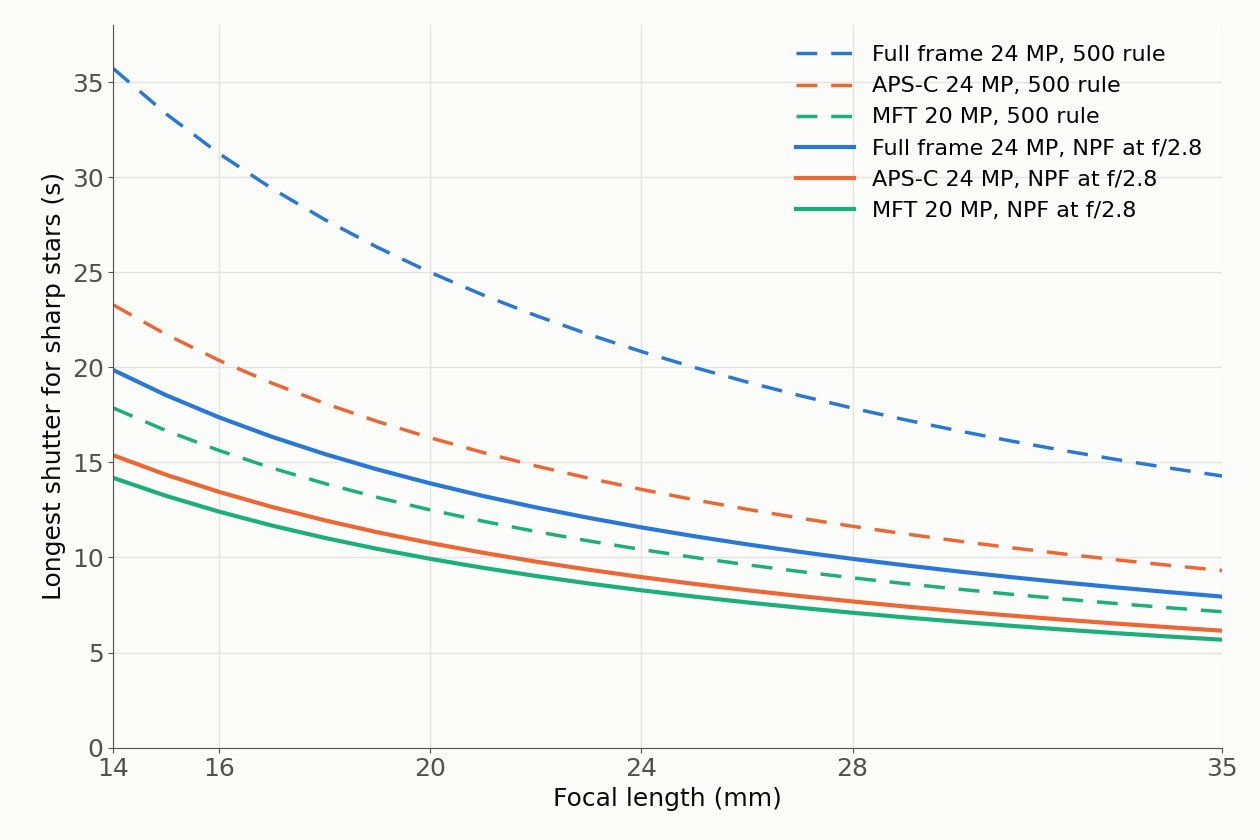
The NPF rule comes from Frédéric Michaud of the Société Astronomique du Havre. He developed it in 2010 to replace the 500 rule. The simplified form is t = (35 × N + 30 × p) ÷ f. Here t is the time in seconds, N the f-number, p the pixel pitch in microns and f the focal length in mm.
Notice what the formula says. Small pixels shorten the time. So does a long lens. A wider aperture shortens it too. Its smaller diffraction blur shows trailing sooner. The 500 rule sees only the focal length.
Pixel pitch rarely appears on a spec sheet. It falls out of two numbers that do: sensor size and pixel count. The tables use that calculation for two pixel counts per format.
Full frame (36 x 24 mm)
| Focal length | 500 rule | NPF f/1.8, 24 MP | NPF f/2.8, 24 MP | NPF f/2.8, 45 MP |
|---|---|---|---|---|
| 14 mm | 35.7 s | 17.4 s | 19.9 s | 16.4 s |
| 16 mm | 31.3 s | 15.2 s | 17.4 s | 14.3 s |
| 20 mm | 25.0 s | 12.2 s | 13.9 s | 11.5 s |
| 24 mm | 20.8 s | 10.1 s | 11.6 s | 9.6 s |
| 28 mm | 17.9 s | 8.7 s | 9.9 s | 8.2 s |
| 35 mm | 14.3 s | 6.9 s | 7.9 s | 6.6 s |
APS-C (23.5 x 15.6 mm)
| Focal length | 500 rule | NPF f/1.8, 24 MP | NPF f/2.8, 24 MP | NPF f/2.8, 40 MP |
|---|---|---|---|---|
| 14 mm | 23.3 s | 12.9 s | 15.4 s | 13.5 s |
| 16 mm | 20.4 s | 11.3 s | 13.5 s | 11.8 s |
| 20 mm | 16.3 s | 9.0 s | 10.8 s | 9.4 s |
| 24 mm | 13.6 s | 7.5 s | 9.0 s | 7.9 s |
| 28 mm | 11.6 s | 6.4 s | 7.7 s | 6.7 s |
| 35 mm | 9.3 s | 5.1 s | 6.1 s | 5.4 s |
Micro Four Thirds (17.3 x 13.0 mm)
| Focal length | 500 rule | NPF f/1.8, 20 MP | NPF f/2.8, 20 MP | NPF f/2.8, 25 MP |
|---|---|---|---|---|
| 14 mm | 17.9 s | 11.7 s | 14.2 s | 13.4 s |
| 16 mm | 15.6 s | 10.2 s | 12.4 s | 11.7 s |
| 20 mm | 12.5 s | 8.2 s | 9.9 s | 9.4 s |
| 24 mm | 10.4 s | 6.8 s | 8.3 s | 7.8 s |
| 28 mm | 8.9 s | 5.8 s | 7.1 s | 6.7 s |
| 35 mm | 7.1 s | 4.7 s | 5.7 s | 5.4 s |
Pixel pitch used: full frame 6.0 µm at 24 MP and 4.4 µm at 45 MP. APS-C 3.9 µm at 24 MP and 3.0 µm at 40 MP. Micro Four Thirds 3.4 µm at 20 MP and 3.0 µm at 25 MP. The 500 rule divides 500 by the full-frame equivalent focal length. Crop factors 1.53 and 2.0 come from the sensor diagonals.
The 500 rule fails on modern sensors
The myth says the 500 rule works on any camera. The numbers say it overshoots on every camera in the tables. Only the size of the miss changes.
At f/2.8 the 500 rule allows these multiples of the NPF limit:
- Micro Four Thirds, 20 MP: 1.26 times.
- APS-C, 24 MP: 1.51 times.
- Full frame, 24 MP: 1.80 times.
- Full frame, 45 MP: 2.18 times.
The ratio is the same at every focal length, because both rules divide by focal length. So a 45 MP full-frame body smears stars about twice as far as the NPF rule tolerates, at 14 mm or at 35 mm.
The reason is old. Michaud traces the 500 rule to film. It keeps a star inside a 0.029 mm blur circle, the value commonly accepted for 24 x 36 mm film prints. A 24 MP full-frame pixel is 0.006 mm wide. The rule was built for a coarser recording medium than the one in your camera.
Half of the myth survives. On Micro Four Thirds the miss is about a quarter. At screen size that softness may pass. On a high-resolution full-frame body, it shows.
Verdict: Use the NPF rule, not the 500 rule. On a 45 MP full-frame camera the 500 rule doubles the star smear the NPF rule allows.
Phone camera settings for northern lights
Phones hide most of the settings above, and their makers publish little about them. This section states only what Apple and Samsung document on their own pages.
iPhone. Apple's support page says Night mode works on iPhone 11 and later. It turns on by itself when the camera detects low light, and its icon turns yellow. A number next to the icon shows how long the capture will take. To go longer, tap the arrow above the viewfinder, tap the Night mode button and move the slider to Max. Apple advises a tripod or a solid surface for the best results. One trap matters at night: flash set to Auto turns on in low light, and turning on flash or Live Photos deactivates Night mode. Set Flash to Off. Apple's page gives no shutter speed or ISO values, so this page gives none either.
Samsung Galaxy. Samsung's support page lists Night mode under More in the Camera app. Samsung says it combines 30 images into one shot. For control, Samsung points to Pro mode, where you choose shutter speed, exposure and aperture. ISO sits among the same controls. Samsung's own night-sky guide adds a tripod, a remote or timed shutter, and Pro mode. Its sample star shot used a 30-second exposure. It suggests a white balance between 3500 and 4500, most likely settling around 4300. That guide covers the Milky Way, not aurora, so treat the numbers as a starting point.
Can a phone use the NPF rule? Only with its pixel pitch. Michaud warns that phone sensor sizes are hard to find, and that phone makers tend to withhold them. Without that number, the rule has nothing to work with.
Put the phone on a phone tripod mount. Every route above assumes a still camera.
The Kp index, read for a photographer
The Kp index measures how disturbed the Earth's magnetic field is. NOAA's Space Weather Prediction Center describes it as a 3-hour index on a scale of 0 to 9. A value of 5 or more means a geomagnetic storm. Kp is the mean standardized K-index from 13 observatories between 44 and 60 degrees geomagnetic latitude.
For a photographer, Kp predicts how far toward the equator the aurora reaches. NOAA's tips page gives a rule: the oval's equatorward edge sits near 66 degrees at Kp 0. It moves about 2 degrees per Kp step, down to 48 degrees at Kp 9. That is geomagnetic latitude, not geographic latitude.
| Kp | Oval's equatorward edge | NOAA description | NOAA storm level and sightings |
|---|---|---|---|
| 0 | 66° | Far north, quite dim, not very active (Kp 0 to 2) | None |
| 1 | 64° | Same | None |
| 2 | 62° | Same | None |
| 3 | 60° | Further from the poles, brighter, more motion (Kp 3 to 5) | None |
| 4 | 58° | Same | None |
| 5 | 56° | Same | G1: commonly visible at high latitudes |
| 6 | 54° | Quite bright and active (Kp 6 to 7) | G2: seen as low as about 55° |
| 7 | 52° | Same | G3: seen as low as about 50° |
| 8 | 50° | Very bright and very active (Kp 8 to 9) | G4: seen as low as about 45° |
| 9 | 48° | Same | G5: seen as low as about 40° |
Edge latitude: 66 − 2 × Kp, from NOAA's tips page. Storm levels and sighting latitudes: NOAA Space Weather Scales. All latitudes are geomagnetic.
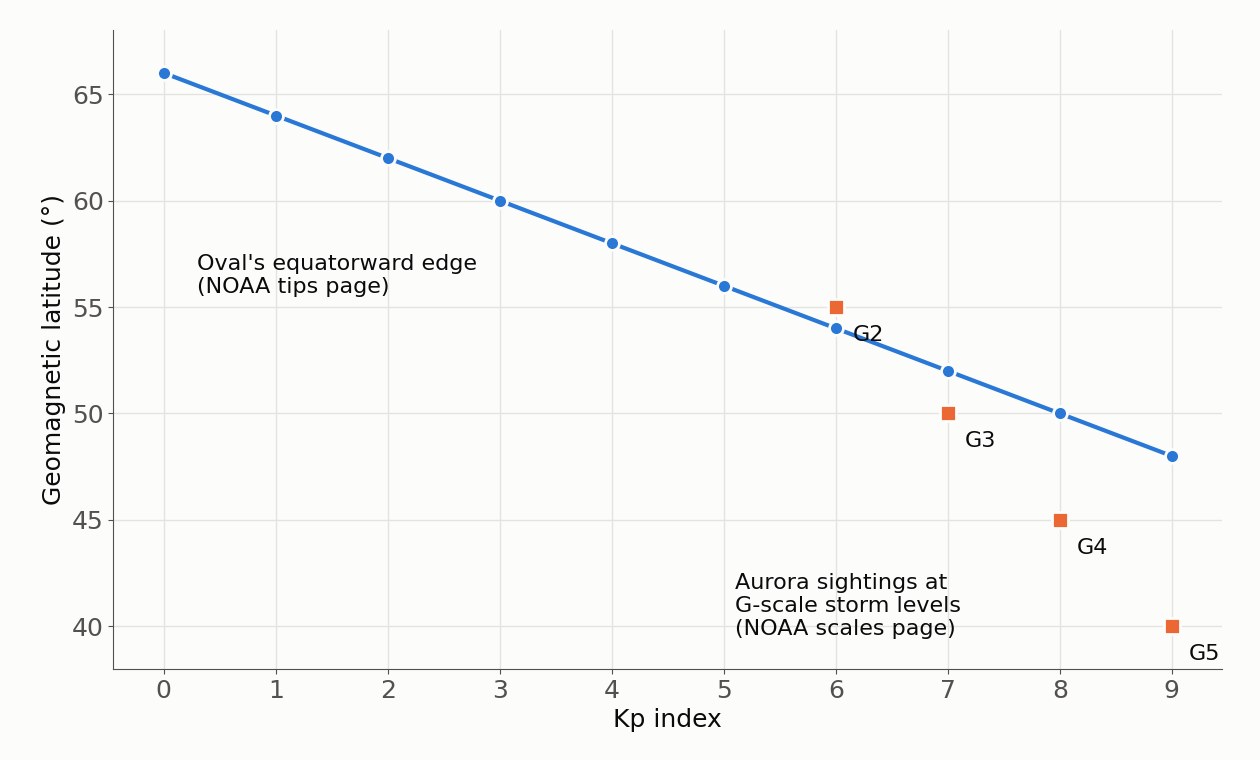
Three NOAA notes change how you plan a night. First, the Kp-to-latitude link is approximate and averaged. Second, the best aurora usually comes within an hour or two of midnight, between 10 PM and 2 AM local time. Third, a full moon dims the aurora's apparent brightness. A higher Kp also means a brighter display, so expect to move down the settings table as Kp climbs.
Focus, file format and the shutter button
Focus manually. Canon's guide suggests the infinity mark as a start, then live view zoomed on a distant light. Turn the ring until that light is as small as it gets.
Shoot raw. A raw file lets you set white balance after the shot. Aurora color is hard to judge on a small screen.
Keep your finger off the camera. Use the self-timer or a remote shutter release. A shutter speed of 13 s is long enough to record a nudge.
What to pack
A night of aurora photography needs four things, in this order.
- A tripod. Every setting on this page assumes the camera does not move. A camera tripod is the one purchase you cannot skip.
- A fast wide lens. The settings table shows the price of f/4: 2.3 stops less light than f/1.8. A 20 mm f/1.8 prime sits in the middle of the NPF tables.
- A remote or the self-timer. The timer costs nothing.
- Spare batteries. Canon's guide notes they drain faster in freezing temperatures.
Once you have aurora frames, the same tripod and lens make star trails. The star trails guide computes how long a trail grows per hour and how many frames that takes.
How the numbers were computed
- NPF limit: t = (35 × N + 30 × p) ÷ f, the simplified NPF rule from the Société Astronomique du Havre.
- 500 rule: t = 500 ÷ (f × crop factor), as derived in Michaud's background article.
- Pixel pitch: p = √(sensor width × sensor height ÷ pixel count). Sensor sizes: 36 x 24 mm, 23.5 x 15.6 mm, 17.3 x 13.0 mm. Real cameras differ slightly, because imaging areas and pixel counts vary by model.
- Crop factor: 43.27 mm (the full-frame diagonal) divided by the sensor's diagonal.
- Settings table: light collected is proportional to time × ISO ÷ N². Each cell keeps that product at Canon's faint preset (20 s × 1600 ÷ 2.8²), divided by the light factor in the second column.
- Kp table: edge latitude = 66 − 2 × Kp, from NOAA's tips page.
Frequently asked questions
- What are the best camera settings for the northern lights?
- Start in manual mode with the lens wide open, ISO 1600 and the shutter speed set by the NPF rule for your lens and sensor. On a 24 MP full-frame camera with a 20 mm lens at f/2.8, that is 13 s at ISO 2500 for a faint display. When the aurora brightens and moves, drop to 3 to 5 s and lower ISO.
- What shutter speed should I use for the northern lights?
- Use the shorter of two limits. The stars set one: the NPF rule gives 13.9 s at 20 mm and f/2.8 on a 24 MP full-frame sensor. The aurora sets the other: Canon's preset for strong, dancing displays is 3 or 5 seconds. For a faint, slow display, the star limit decides. For a moving one, the motion limit decides.
- What are the iPhone camera settings for the northern lights?
- Apple documents no manual shutter or ISO for Night mode. It turns on by itself in low light on iPhone 11 and later. A number next to the Night mode icon shows the capture time, and the slider can be set to Max. Put the phone on a tripod or a solid surface. Set Flash to Off, because flash deactivates Night mode.
- What phone camera settings work on a Samsung Galaxy?
- Samsung offers two routes. Night mode, under More in the Camera app, combines 30 images into one shot. Pro mode lets you choose shutter speed and ISO yourself. Samsung's own night-sky guide uses a tripod, a remote or timed shutter, Pro mode and a white balance between 3500 and 4500.
- What Kp index do I need to see the northern lights?
- It depends on your geomagnetic latitude. NOAA puts the oval's equatorward edge near 66 degrees at Kp 0. It moves about 2 degrees toward the equator per Kp step, down to 48 degrees at Kp 9. NOAA also notes that under the oval, Kp 3 or 4 can give very nice displays.
- Does the 500 rule work for aurora photos?
- Only roughly. The 500 rule dates from film and assumes a 0.029 mm blur circle. Modern pixels are far smaller. At f/2.8 it allows 1.3 times the NPF limit on a 20 MP Micro Four Thirds camera. On a 45 MP full-frame camera it allows 2.2 times. Stars smear accordingly.
Sources
- Planetary K-index, NOAA Space Weather Prediction Center (2026)
- Tips on Viewing the Aurora, NOAA Space Weather Prediction Center (2026)
- NOAA Space Weather Scales, NOAA Space Weather Prediction Center (2026)
- La Règle NPF, Frédéric Michaud, Société Astronomique du Havre (2020)
- Les coulisses de la règle NPF, Frédéric Michaud, Société Astronomique du Havre (2026)
- Use Night mode on your iPhone, Apple Support (2026)
- How to use Night mode on your Galaxy smartphone camera, Samsung UK Support (2023)
- Capture the Galaxy with Galaxy, Samsung Malaysia (2026)
- Northern Lights Photography, Instructables (2026)
- Northern Lights Photography Tips with Neil Bloem, Canon Australia (2026)